Written by the E-Insure First Content Team | Reviewed by Sunil Goyal, Director, E-Insure First | Last updated: August 2026
Quick Answer:
To check Genins claim status, visit geninsindia.com/claim/status , select your policy type, and enter your claim number, policy number, or employee number. No login is required for a one-time status check. If the portal isn't showing your result, Genins India's toll-free customer care (1800 890 2359) or their claims email (gil@geninsindia.com ) both work as backup routes.
A lot of people search for their Genins India claim status and land on their insurer's app first, then get confused when nothing shows up. That's because Genins isn't the insurer — it's the administrator working behind the scenes for insurers like National Insurance, United India, and Oriental Insurance. Once you know that, checking your claim gets a lot simpler.
This guide covers every way to track it, what each status stage actually means, and what to do when the portal seems stuck. If you're dealing with another health insurance TPA, you can also learn how to check your FHPL claim status using a similar online process.
Claim stuck and not sure who's actually responsible for the delay — Genins or your insurer? Ask E-Insure First — we'll help you figure out where to push.
What is Genins TPA?
Genins India Insurance TPA Limited is a Third-Party Administrator, licensed by IRDAI (License No. 020), founded in 1996 and headquartered in New Delhi. It processes health insurance claims — cashless and reimbursement — on behalf of insurers, coordinating with a network of 5,500+ hospitals across roughly 23 branches nationwide. Genins doesn't decide what your policy covers or make the final call on your claim; that decision sits with your insurer. Genins verifies documents, coordinates with hospitals, and keeps your claim moving until the insurer gives final approval. If you're unfamiliar with the role of a Third-Party Administrator, here's a detailed guide explaining what a TPA is in insurance and how it works.
How to Check Genins Claim Status Online?
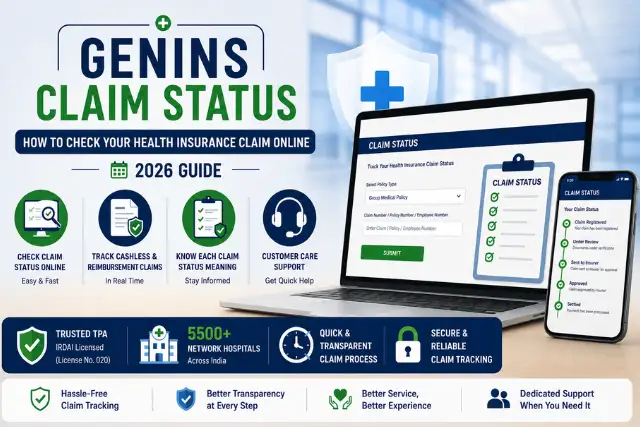
Here's how to check Genins claim status online in a few steps:
Step 1: Visit the official Genins claim status page.
Step 2: Select your policy type — for most corporate policyholders, this is "Group Medical Policy" — then enter your employee number and policy number, or your claim number directly.
Step 3: Click Submit.
Step 4: Your latest claim status will display on screen, and in most cases you'll also get an SMS or email update to your registered contact details.
No account creation or login is needed for this one-time lookup — it's a straightforward reference-number search, which makes it faster than most insurer portals that require a full account setup first.
Ways to Check Genins Claim Status
| Method | Best For |
| Online Portal (geninsindia.com/claim/status) | Fastest, no login required |
| Genins CMS Connect Mobile App | Existing users who want ongoing tracking and notifications |
| Customer Care (1800 890 2359) | Portal errors or when you don't have your reference number handy |
| Email (gil@geninsindia.com) | Document-related queries or written confirmation |
What Each Claim Status Means
| Status | What It Means |
| Claim Registered | Your claim has been logged into Genins' system and assigned a claim number. |
| Under Review | Genins is verifying your documents against the hospital bill and policy terms. |
| Documents Pending | Something's missing — check your email or SMS for the exact list requested. |
| Query Raised | Genins or the insurer needs clarification on a specific detail before proceeding. |
| Sent to Insurer | Verification is complete, and the claim is now with the insurer for final approval. |
| Approved | The insurer has sanctioned the claim; payment processing begins. |
| Rejected | The claim has been denied — check the rejection reason, which is usually shared in writing. |
| Settled | Payment has been made, either to the hospital (cashless) or your bank account (reimbursement). |
| Closed | The claim file is fully closed with no further action pending. |
Cashless vs. Reimbursement Claim Status
These two move through the system differently, and it helps to know which one you're tracking:
| Cashless Claim | Reimbursement Claim |
| Hospital initiates the request before or at admission | You submit the claim after paying and being discharged |
| Status typically updates within hours | Status only starts moving once documents are logged |
| Tracked using the pre-authorisation number | Tracked using the claim number issued after submission |
| Settlement goes directly to the hospital | Settlement goes to your registered bank account |
How to Track a Cashless Claim vs. a Reimbursement Claim
For a cashless claim, use the pre-authorisation number the hospital gave you at admission — this is usually the fastest-updating reference. For reimbursement, use the claim number you received after submitting your documents; if that hasn't arrived yet, it likely means your paperwork hasn't been fully logged into the system. If you're unsure how pre-authorisation works, read our guide on the Medi Assist pre-auth form.
Documents or Details Required
| Detail | Where to Find It |
| Claim Number | SMS/email confirmation sent after claim registration |
| Policy Number | Your insurance policy document or ID card |
| Employee/Member ID | Corporate ID card or HR-issued policy documents |
| Registered Mobile Number | The number linked to your policy at enrolment |
| Email ID | The email used during policy registration |
| Hospital Name | Needed if contacting customer care rather than using the portal |
Typical Genins Claim Processing Timeline
| Stage | Typical Duration |
| Cashless Approval | A few hours to same-day, once the hospital submits pre-authorisation |
| Document Verification | 1–3 working days after documents are received |
| Insurer Review | Varies by insurer, typically a few working days |
| Reimbursement Processing | Begins only after insurer approval is confirmed |
| Final Settlement | Payment released to hospital or bank account once approved |
These are typical ranges, not guarantees — actual timelines shift depending on the insurer, the hospital's response speed, and how complete your documents were on first submission.
Why Your Claim Status Isn't Showing
This is usually one of these, in order of how often it happens:
- Wrong claim number - A single digit off is enough to return no results.
- Incorrect employee or member ID - Double-check against your actual ID card rather than typing from memory.
- Hospital hasn't uploaded documents yet - For cashless claims, the status can't move until the hospital's insurance desk submits the pre-auth request.
- Claim recently submitted - There's often a short lag between submission and the claim appearing searchable in the portal.
- Mobile number mismatch - If you've changed your number since enrolment, the system won't recognise it.
- Portal maintenance - Occasional downtime happens — try again after a few hours or use customer care instead.
- Claim not yet registered - If intimation was only verbal or informal, it may not have created a trackable record yet.
Common Reasons for Claim Delay
- Missing documents: The single most common cause of a stalled claim.
- Medical clarification needed: Genins or the insurer may need the treating doctor to clarify a diagnosis or procedure.
- Policy waiting period: Some conditions carry a waiting period before they're eligible for coverage.
- Hospital delay: Slow document submission on the hospital's end holds up everything downstream.
- Insurer approval pending: Once Genins forwards the claim, final sign-off timing depends on the insurer, not Genins.
- High claim volume: Processing can slow during peak periods, particularly around policy renewal season.
- Incorrect bank details: An approved claim still can't be paid out if the account details on file don't match.
What to Do If Your Claim Is Rejected?
- Read the rejection reason carefully — it's usually communicated in writing, not just as a status label.
- Check your policy's exclusions to see if the reason cited is actually accurate.
- Submit any missing documents if that's the stated cause.
- Request a formal review from Genins if you believe the rejection is incorrect.
- Contact your insurer directly, since they hold the final decision authority, not Genins.
- Raise a grievance with Genins' escalation contacts if the review doesn't resolve it.
- Approach IRDAI or the Insurance Ombudsman if the matter remains unresolved after internal escalation.
Claim Status Not Updated for More Than 7 Days? Here's What to Do
If your status hasn't budged in over a week, stop refreshing the portal and call customer care directly with your claim number ready. Ask specifically whether the claim is still with Genins for verification or has already been forwarded to the insurer — that one question tells you who to follow up with next, since the two have different response timelines.
Common Claim Status Errors and Their Solutions
| Error | Likely Fix |
| "No record found" | Re-check claim/policy number for typos, or try searching by mobile number instead |
| Status frozen on "Under Review" for weeks | Call customer care to confirm if additional documents are silently pending |
| Status shows "Sent to Insurer" with no further update | Contact the insurer directly, since Genins' role is effectively complete at this stage |
| Portal not loading | Try the mobile app or wait out temporary maintenance windows |
Can Someone Else Check Your Genins Claim Status?
Yes, technically anyone with your claim number, policy number, or employee ID can look up the status, since the portal doesn't require an account login for a basic check. That said, treat these details with the same care as any other financial reference number — share them only with people directly helping you with the claim, like a family member or your insurance advisor.
Genins Customer Care
Before contacting customer care, keep your claim number, policy number, and registered mobile number ready. You can also verify Genins branch details and official contact information on the Genins India Insurance TPA website.
| Channel | Details |
| Phone (Toll-Free) | 1800 890 2359 |
| Senior Citizen Claims | 011-4575 3500 |
| gil@geninsindia.com | |
| Office Hours | 24/7 helpline for claim queries |
| Website | http://geninsindia.com/ |
| Registered Address | Genins India Insurance TPA Limited, Jhandewalan Extension, New Delhi – 110055 |
When Should You Contact Customer Care?
Use the direct method, rather than the portal, if: Your case has not changed in over a week. You have your claim number handy but the system has it listed incorrectly or you've misplaced your claim number altogether and require someone to look up by your social security number or account. The system is throwing errors when trying to access your case online.
Key Takeaways
- Genins is a Third-Party Administrator (TPA), not the insurer.
- You can check claim status online without creating an account.
- Cashless and reimbursement claims follow different workflows.
- Missing documents are the most common reason for claim delays.
- Contact customer care if your status hasn't changed for more than seven days.
Final Verdict
The easiest way to check Genins claim status is the online portal with your claim number ready — it's faster than a phone call and needs no login. If the status isn't updating, first rule out a typo or an outdated mobile number before assuming something's wrong. If your claim remains pending for more than a week, contacting customer care directly is usually the fastest way to get an update. You can also compare the process with our guide on Vidal Health claim status to better understand how different TPAs handle claim tracking.
Dealing with a delayed Genins claim and not sure who to push — the TPA or the insurer? Talk to E-Insure First — no charge for the first consultation.
Tips for Faster Genins Claim Processing Submit all required documents together. Ensure hospital records are complete and accurate. Keep your registered mobile number updated. Track your claim regularly through the portal. Respond promptly to any document or clarification requests. Save your claim reference number for future follow-up.
Tips to Get Faster Claim Approval
- Submit complete documents on the first attempt rather than in batches — partial submissions restart the review clock more often than people expect.
- Check your policy coverage before treatment where possible, so there are no surprises at the claims stage.
- Upload clear, legible scans — blurry bills or discharge summaries are a frequent cause of "documents pending" status.
- Keep your claim number saved somewhere accessible the moment you receive it.
- Respond to document requests within a day or two — the longer a query sits unanswered, the further back in the queue your claim can fall.
Frequently Asked Questions (FAQs)
How do I check Genins claim status online?
Visit geninsindia.com/claim/status, select your policy type, and enter your claim number, policy number, or employee number. Results display instantly without needing to log in.
Can I check claim status without logging in?
Yes. The online portal only needs your reference number, not a full account login, for a one-time status check.
How long does Genins reimbursement take?
It varies by insurer and how complete your documents were at submission, but processing generally begins only after document verification and insurer approval are both complete.
Why is my Genins claim still under review?
This usually means Genins is still verifying your documents against the hospital bill and policy terms, or is waiting on a query response from you or the hospital.
What if my Genins claim is rejected?
Read the written rejection reason, check it against your policy exclusions, and either submit missing documents or request a formal review. If unresolved, escalate to your insurer and then to IRDAI or the Insurance Ombudsman.
Where can I find my Genins claim number?
It's sent via SMS or email once your claim is registered. If you can't locate it, customer care can look it up using your policy number and registered mobile number.
Do Genins approve claims?
No. Genins verifies documents and coordinates the process, but the final approval decision rests with your insurer.
How do I contact Genins?
Call their toll-free number, 1800 890 2359, or email gil@geninsindia.com. Senior citizen claims have a separate contact line at 011-4575 3500.
Is Genins India TPA and Genins claim status the same portal?
Yes, both refer to the same official Genins India Insurance TPA system — the claim status page is one section within their broader policyholder services.
About E-Insure First: E-Insure First is an independent insurance advisory platform led by Director Sunil Goyal, helping Indian policyholders compare, buy and manage general and health insurance policies. This article reflects publicly available information from Genins India Insurance TPA Limited (IRDAI License No. 020) as of August 2026, and is updated periodically. It does not replace guidance from Genins or your insurer — always verify claim-specific details directly with them, since contact numbers and portal processes can change.